








AI advertising platform

Advertising gets complicated.
ORIVEN puts it in ORDER.

Create, launch and improve ads across every platform, from one workspace.

See how it works

Real ads. Every platform.

Switch platforms to explore illustrative advertising creatives.

The Oriven system

Six parts.
One workflow.

Every part moves the next one forward.

  1. 01 / 06 Context

    Control Center

    See what is happening, what needs you and what is planned, with your business context behind it.

  2. 02 / 06 Intelligence

    Research

    Investigate markets, competitors and audiences, and map what you find.

  3. 03 / 06 Creative

    Create

    Turn a brief into platform-ready creative and campaign structure.

  4. 04 / 06 Campaign

    Launch

    Review readiness, fix what blocks a launch, and publish to your platforms.

  5. 05 / 06 Control

    Campaigns

    Follow spend, delivery, traffic and conversions across your platforms.

  6. 06 / 06 Continuity

    Automations

    Schedules and rules that manage your published campaigns within your limits.

Connected from the start

One system.
Your advertising workflow.

Continue to the product

Oriven is built for the way you advertise.

One workspace, six capabilities. Select one to see it in action.

Creative & copy

Create

Turn a brief into platform-ready ad creative and copy.

Researching & discovering

Research

Investigate a market and see the evidence behind it.

Publishing

Launch

Review readiness and launch to your connected platforms.

Managing & measuring

Campaigns

Follow performance across your connected platforms.

Schedule, watch, act

Automations

Schedules and rules that manage your campaigns within your limits.

Connecting brand & context

Control Center

The business context behind every plan, ad and recommendation.

A connected advertising workflow

From context.To campaign.To control.

  1. Context Control Center and Research give Oriven the brand, audience, market and competitors behind every ad.
  2. Campaign That context becomes the creative, the copy and the campaign structure.
  3. Control Once live, every connected platform reports back into one Campaigns view.
Made to be seen

Advertising
made here.

Illustrative creative examples. No customer results implied.

Coffee advertising creative
Image / CoffeeCreative example
Motion / TeaCreative example
Watch advertising creative
Image / WatchesCreative example
Sparkling drink advertising creative
Image / BeverageCreative example
Travel advertising creative
Image / TravelCreative example
Activewear advertising creative
Image / ApparelCreative example
Interior advertising creative
Image / InteriorsCreative example
Motion / CandleCreative example
Headphones advertising creative
Image / AudioCreative example
Eyewear advertising creative
Image / EyewearCreative example

Experience Oriven Yourself

Start Creating →
Control

Built around your control.

AI should not remove control. It should organize it.

  • BudgetSet the budget. Oriven works inside it.
  • StatusSee what is live, ready to launch or still a draft.
  • PlatformsConnected over OAuth. Your accounts stay yours.
  • PerformanceSpend, clicks, CTR, CPA and ROAS in one view.
  • RulesYou write the conditions automations watch for.
  • AutomationsAct only on your schedules and rules, within the limits you set.

AI where it helps. Control where it matters.

Questions,
answered.

Everything you need to know before connecting your ad accounts.

Oriven is one workspace for advertising, in six steps: Control Center for what is happening, what needs you and what is planned, with your business context; Research to investigate a market; Create to build platform-ready ads; Launch to review and publish them; Campaigns to follow performance; and Automations for schedules and rules that act within your limits.
Credits are Oriven's shared monthly usage balance. A complete image ad costs 100 credits, a video ad 225, a chat message 5. They're spent from one pool across every usage-based feature, not a separate allowance per feature.
It depends on your plan and how you split your credits. Starter's 1,000 credits a month is enough for roughly 10 image ads or 4 video ads if used entirely on one type. Fewer if you also spend credits on Research or other usage. There's no separate ad limit beyond your credit balance.
Free covers a limited workflow: Control Center, Create, Launch and Campaigns. Starter adds Research and Automations for the full advertising workflow. Creator adds Oriven Chat and in-app notifications. Professional adds Priority Support and a Weekly AI Performance Report by email (coming soon). See the full breakdown on Pricing →
Google Ads, Meta Ads (Facebook & Instagram), TikTok Ads, and Pinterest Ads. Every integration uses OAuth. You never share your passwords with Oriven, and we never store your credentials.
Yes. Connect your existing Google Ads, Meta Ads, TikTok Ads or Pinterest Ads accounts and manage the campaigns already running on them from Oriven. You don't need to start from scratch.
Ask a question and choose market, competitor, audience or opportunity research. Research runs targeted web searches using your industry and country, reads the most relevant pages, your own website and any pages you attach, and returns a report built for that type, starting with the key conclusions. A finding is only marked Source-checked when the passage it quotes was found in a page it read; others are marked Cited, Analysis or Idea to test. It has no access to competitors’ ad performance, and reports are saved to your account. Included from Starter.
Automations let you schedule your published campaigns, like switching them on during business hours, and set rules like "if CPA is above €25 over 7 days, lower the budget by 15%". Each rule either notifies you, asks for your approval or acts within the limits you set. Included from Starter.
You can start creating without a credit card, and your first full campaign generation is free before you need to choose a plan. Cancel anytime once you're subscribed.
Yes. Automations only act on schedules and rules you explicitly set, like a CPA threshold, and every module stays manually editable at any time. Nothing runs on its own without a rule behind it.
Everything, in order

Put your advertising workflow in ORDER.

Get started

Welcome back

Sign in to your brand intelligence workspace.
Forgot password?

Create your account

Join ORIVEN and build your brand intelligence system.
By creating an account you agree to our Terms of Service.
About Oriven

Built to solve a real problem
in advertising.

Marketing data is scattered across platforms. Oriven brings it together so you can spend less time in dashboards and more time making better decisions.

Our Story

Oriven started from
a real frustration.

While working on e-commerce projects and running advertising campaigns, I constantly found myself switching between platforms just to understand what was happening.

Google Ads, Meta Ads and TikTok Ads all provided valuable information, but none of them showed the complete picture. Important data was spread across multiple dashboards, reports and interfaces.

The more campaigns I worked on, the more obvious the problem became. Marketing data is fragmented, and that fragmentation costs businesses both time and money.

I started building Oriven to solve that problem. The goal was simple: bring marketing intelligence together in one place and help businesses make faster, better advertising decisions.


Our Mission

Marketing data is fragmented.
We’re here to fix that.

Businesses running ads across multiple platforms lose hours every week switching between tools, exporting reports, and trying to piece together a complete picture. That time and focus should go toward making better decisions, not manually stitching data together.

■
Unified advertising data
Google Ads, Meta Ads, TikTok Ads and Pinterest Ads connected in one place. One dashboard, one source of truth, zero platform-switching.
■
Time back in your day
Stop spending hours building reports. Oriven surfaces what matters automatically so your team can focus on decisions, not data entry.
■
Decisions backed by insight
Cross-platform visibility and AI analysis turn fragmented numbers into clear direction, so every budget decision is grounded in real performance.
Our Vision

One place for every
advertising decision.

We’re building the platform that makes cross-platform advertising simple to understand and act on, regardless of how many platforms you run or how complex your campaigns get.

01
Unified analytics
All your advertising performance in one view. No switching tabs, no cross-referencing exports: a single, coherent picture of what’s working.
02
Cross-platform visibility
See how Google, Meta, TikTok and Pinterest campaigns perform side by side. Understand the full funnel, not just isolated platform metrics.
03
Actionable insights
Data that tells you what to do next. AI analysis surfaces specific opportunities and risks so the path forward is always clear.
04
Built for simplicity
Powerful enough for agencies, simple enough for solo marketers. Oriven removes complexity without removing capability.
The Team

A Small Team With A Clear Focus

One founder, one clear problem to solve, and a platform built from firsthand experience running advertising campaigns across multiple platforms.

Alec Kauffmann, founder of OrivenAI
Alec Kauffmann
Founder & CEO
Building Oriven to help businesses understand, manage and improve advertising performance through unified marketing intelligence.

Company details

ORIVEN · Registered in the Netherlands · KVK: 42039993
Contact: contact@orivenai.com

Start bringing your
data together.

Start free, connect your ad accounts and create your first campaign in one workspace.

Get Started
Blog

Oriven Blog

Insights, Updates and Ideas from the Oriven Team

OrivenAI Is Now Live
What OrivenAI is, what you can do with it today across Google, Meta, TikTok and Pinterest, and how to get started.
Read Article
What You Can Do With OrivenAI
A walkthrough of Control Center, Research, Create, Launch, Campaigns and Automations, and which ad platforms each supports.
Read Article
Why We Built OrivenAI
Small teams juggle separate tools to research, create, launch and watch their ads. The problem we saw, and the principles behind OrivenAI.
Read Article
The Platform

One workspace.
Every ad platform.

Oriven connects to Google Ads, Meta Ads, TikTok Ads and Pinterest Ads. Research, creative, launch, campaign management and automation all work from the same connected context.

One Connected Workflow

Six products.
The same context.

Research informs Create. Create feeds Launch. Launch reports into Campaigns. Automations act on what Campaigns measures. Business context runs underneath all of it.

✓Research what's working before you spend
✓Create platform-ready campaign assets
✓Launch campaigns across connected platforms
✓Review every campaign in one workspace
✓Automate optimization with rules you control
✓Keep it consistent with your Business context

Ready to bring it
all together?

Connect your ad accounts and launch your next campaign from one workspace.

Get Started
Solutions

Six problems.
Six real answers.

Every solution below maps to one real Oriven product. No audience segments, no generic promises, just the actual thing that fixes it.

Solutions

Start with what's
actually slowing you down.

Six real problems in advertising. Six products built to solve them, connected to the same business context.

✎
Every ad starts from a blank page.
Writing copy, briefing a designer, resizing for five platforms. Before a single ad is live, the manual work has already eaten your week.
  • Turn a prompt into a platform-ready ad
  • Image and video, in your brand's voice
🔍
You're guessing what will actually work.
Every new campaign starts from opinion, not evidence. By the time an idea proves wrong, the budget is already spent.
  • See what's working before you spend
  • Every finding backed by a real source
🚀
Setting up one campaign takes half a day.
Structuring ad sets, writing platform-specific copy, checking every setting twice. Setup takes longer than the campaign deserves.
  • A brief becomes a structured campaign
  • Built for the platform you're launching on
📋
Your campaigns live in five different tabs.
Live campaigns on one platform, drafts on another, half-finished edits nobody remembers starting. Nothing lives in one place.
  • Every campaign in one workspace
  • Live, in review, or still a draft
⚡
You keep doing the same optimization work.
Pausing the same underperforming ad set, reallocating the same wasted budget, by hand, every single week.
  • Rules that act while you don't have to
  • Nothing runs without a rule you turned on
🏢
Every tool treats your brand like a stranger.
Re-explaining your product, your voice and your audience to every generator, every time, because nothing remembers who you are.
  • One business profile, set up once
  • Every product builds on the same context

Pick your starting point.
The rest connects.

Every product above shares the same business context, so nothing you set up goes to waste.

Get Started

Google Ads,
built into one workspace.

Connect your Google Ads account and Oriven creates, launches and tracks campaigns for you. Search, Performance Max and Demand Gen, backed by real reporting.

Direct Connection

Oriven connects directly
to your Google Ads account.

Through this connection, Oriven can build and publish real campaigns on your behalf, not just report on them.

✓Discover your manager accounts
✓Create and launch campaigns
✓Support Search, Performance Max and Demand Gen
✓Set up conversion tracking
✓Track real performance data
✓Keep campaigns in your Business context
✓Review before anything goes live
✓Manage it all from one workspace
What You Get

From account to live campaign.
Without leaving Oriven.

Connect your Google Ads account. Oriven handles setup, creative and publishing, then keeps reporting real and current.

Campaign Creation & Launch
Oriven builds and publishes Google Ads campaigns through Google's own API. Search, Performance Max and Demand Gen, ready to go live.
Manager Account Discovery
Oriven finds every manager and ad account you already have access to, so setup starts from what already exists.
Conversion Tracking
Oriven creates and verifies conversion actions and retrieves the tracking snippet your website needs.
Performance Reporting
Real campaign data, pulled directly from Google Ads. No exports, no manual reporting.
Connected business context
Campaigns draw on the same business and brand context from Control Center, so Google Ads stays consistent with everything else you run.
One Connected Workflow
Research, create and launch Google Ads campaigns, then track results, without switching tools.
In detail

What OrivenAI builds on Google Ads

OrivenAI connects to your Google Ads account through Google’s official API and creates complete campaigns, paused, for three campaign types.

  1. Search. Ad groups with keywords and match types, negative keywords, responsive search ads (headlines up to 30 characters, descriptions up to 90), callouts, structured snippets, and sitelinks once they point to a real page.
  2. Performance Max. An asset group with headlines, a long headline, descriptions, square and landscape images, plus your business name and logo.
  3. Demand Gen. An ad group with images, headlines, descriptions and your logo.
  4. Targeting and bidding. Countries and languages you choose; a bidding strategy that follows your goal.

Who it’s for

  • Businesses whose customers search for what they sell
  • Advertisers who want Search, Performance Max and Demand Gen from one brief

Good to know

  • Sales and Leads campaigns need conversion actions in your Google Ads account
  • Performance Max and Demand Gen need a logo and business name in your profile
  • Campaigns are created paused; Google reviews ads under its own policies

Questions

Does OrivenAI change my existing Google Ads campaigns?

Not unless you ask it to: it creates new campaigns, and Automations only act through schedules and rules you set up.

Which bidding strategy is used?

One that matches your goal, for example maximising conversions for Sales or clicks for Traffic. You can change it in Google Ads.

Launch your next
Google Ads campaign.

Connect your account and let Oriven handle setup, creative and tracking.

Get Started

Meta Ads,
from creative to launch.

Connect Facebook and Instagram advertising to Oriven. Create campaigns, launch them through Meta's own API and track results in one workspace.

Direct Connection

Oriven connects directly
to your Meta Business account.

Through this connection, Oriven can build and publish real campaigns to Facebook and Instagram, not just report on them.

✓Discover Pages and Instagram accounts
✓Create and launch campaigns
✓Set up Meta Pixel tracking
✓Test server-side (Conversions API) events
✓Track real performance data
✓Keep campaigns in your Business context
✓Review before anything goes live
✓Manage it all from one workspace
What You Get

From account to live campaign.
Without leaving Oriven.

Connect your Meta Business account. Oriven handles setup, creative and publishing, then keeps tracking accurate as it changes.

Campaign Creation & Launch
Oriven builds and publishes Meta campaigns through Meta's Marketing API, ready to run on Facebook and Instagram.
Business Manager & Assets
Oriven discovers the Pages, Instagram accounts and Business Manager you already have connected.
Pixel & Conversions API
Oriven finds or creates your Meta Pixel, checks that it receives events, and can send a test server-side event to confirm a Conversions API connection.
Performance Reporting
Real campaign data pulled directly from Meta's own Insights API.
Connected business context
Campaigns draw on the same business and brand context from Control Center, so Meta stays consistent with everything else you run.
One Connected Workflow
Research, create and launch Meta campaigns, then track results, without switching tools.
In detail

What OrivenAI builds on Meta

OrivenAI creates Facebook and Instagram campaigns through Meta’s Marketing API, paused: the campaign, ad sets and ads, with targeting and tracking you’ve confirmed.

  1. Campaign. The objective that matches your goal, and your answer on special ad categories (housing, employment, financial products, social issues), which Meta requires.
  2. Ad sets. Countries, languages, age range, placements (Facebook and Instagram, or one of them) and your daily budget. Extra ad sets can target different age groups.
  3. Ads. Image ads with your headline, primary text and call to action, published from your Facebook Page and linked Instagram account.
  4. Tracking. For Sales and Leads, the Meta Pixel you choose and the conversion event to optimise for. If the ad targets the EU, the transparency details Meta asks for.

Who it’s for

  • Businesses selling to consumers on Facebook and Instagram
  • Advertisers who want campaigns built with targeting and tracking already filled in

Good to know

  • Meta video ads aren’t published by OrivenAI yet; image ads are
  • If your ad account has several pixels, you choose which one; OrivenAI never picks silently
  • OrivenAI can create a Pixel and send a test server event; your website still needs the Pixel or a Conversions API integration to report real conversions

Questions

Do I need a Facebook Page?

Yes. Meta ads run from a Page; Instagram placements also need an Instagram account linked to it.

Will OrivenAI turn my campaign on?

No. It’s created paused, and you activate it in Meta Ads Manager.

Launch your next
Meta campaign.

Connect your account and let Oriven handle setup, creative and tracking.

Get Started

TikTok Ads,
without switching tools.

Connect TikTok Ads to Oriven. Create and launch campaigns through TikTok's own API, alongside Google, Meta and Pinterest.

Direct Connection

Oriven connects directly
to your TikTok Ads account.

Once you have a TikTok Business Center, Oriven creates your advertiser account under it and publishes campaigns through TikTok's own API.

✓Connect your TikTok Ads account
✓Create your advertiser account
✓Create and launch campaigns
✓Link your TikTok Pixel
✓Test server-side (Conversions API) events
✓Track real performance data
✓Keep campaigns in your Business context
✓Manage it all from one workspace
What You Get

From account to live campaign.
Without leaving Oriven.

Connect your TikTok Ads account. Oriven handles setup, creative and publishing, then keeps reporting real and current.

Campaign Creation & Launch
Oriven builds and publishes TikTok campaigns, from campaign down to ad group and ad, through TikTok's own API.
Advertiser Account Setup
Oriven creates your advertiser account under an existing TikTok Business Center, once one exists.
Pixel Linking & Events API
Link the pixel you created in TikTok Ads Manager and send server-side conversion events directly from Oriven.
Performance Reporting
Real campaign data pulled directly from TikTok's own reporting API.
Connected business context
Campaigns draw on the same business and brand context from Control Center, so TikTok stays consistent with everything else you run.
One Connected Workflow
Research, create and launch TikTok campaigns, then track results, without switching tools.
In detail

What OrivenAI builds on TikTok

OrivenAI prepares TikTok video ads and creates them through TikTok’s Marketing API, paused, for traffic and awareness goals.

  1. Video. A vertical video generated in Create (or your own), uploaded with a cover image.
  2. Ad group. Your countries, age range, language, daily budget and TikTok identity (the name and picture shown on the ad).
  3. Ad. A hook and ad text of up to 100 characters, your call to action and a landing page with tracking parameters.

Who it’s for

  • Businesses with products that look good on camera
  • Advertisers testing short-form video for the first time

Good to know

  • TikTok ads from OrivenAI are video only
  • Traffic and Awareness goals are supported; Sales and Leads aren’t yet (they need the TikTok Pixel or lead forms)
  • TikTok requires a daily ad group budget above $20 (or the equivalent in your currency)
  • Pausing and editing happen in TikTok Ads Manager

Questions

Can I run image ads on TikTok with OrivenAI?

No. TikTok’s main feed runs video, so OrivenAI only creates video ads for TikTok.

What do I need before publishing?

A connected TikTok ad account, a TikTok identity, your countries, a video and a daily budget above TikTok’s minimum.

Launch your next
TikTok campaign.

Connect your account and let Oriven handle setup, creative and tracking.

Get Started

Pinterest Ads,
fully connected.

Connect Pinterest Ads to Oriven. Create your ad account, build campaigns and launch Pins through Pinterest's own API.

Direct Connection

Oriven connects directly
to your Pinterest account.

Once you have Pinterest Business Access, Oriven can create your first ad account for you and publish campaigns through Pinterest's own API.

✓Connect your Pinterest account
✓Create your first ad account
✓Create and launch campaigns
✓Set up Pinterest Tag tracking
✓Test server-side (Conversions API) events
✓Track real performance data
✓Keep campaigns in your Business context
✓Manage it all from one workspace
What You Get

From account to live campaign.
Without leaving Oriven.

Connect your Pinterest account. Oriven handles setup, creative and publishing, then keeps reporting real and current.

Campaign, Board & Pin Creation
Oriven builds full Pinterest campaigns, from campaign and ad group down to the Pin itself, through Pinterest's own API.
Ad Account Setup
Oriven can create your first Pinterest ad account directly, once you have Pinterest Business Access.
Pinterest Tag & Conversions API
Oriven creates and verifies your Pinterest Tag and sends server-side conversion events, including safe test events before anything goes live.
Performance Reporting
Real campaign data pulled directly from Pinterest's own reporting API.
Connected business context
Campaigns draw on the same business and brand context from Control Center, so Pinterest stays consistent with everything else you run.
One Connected Workflow
Research, create and launch Pinterest campaigns, then track results, without switching tools.
In detail

What OrivenAI builds on Pinterest

OrivenAI creates Pinterest campaigns through Pinterest’s API, paused: a Pin from your creative, an ad group targeting your countries, and the ad.

  1. Pin. Your image (or video) with a title, description and alt text, saved to a board for your ads.
  2. Ad group. The countries you advertise in and, for Sales and Leads, your Pinterest tag and the conversion event to optimise for.
  3. Campaign and ad. The objective matching your goal, a daily spend cap, and the ad pointing to your page with tracking parameters.

Who it’s for

  • Businesses in home, fashion, food, beauty, gifts and events
  • Advertisers who want to reach people while they plan purchases

Good to know

  • Sales and Leads campaigns need a Pinterest tag on your ad account
  • Pinterest ads are only available in some countries; OrivenAI warns you if yours isn’t one of them
  • Pinterest recommends 2:3 images (1000 × 1500 px)

Questions

Do I need a Pinterest business account?

Yes. Pinterest requires a business account to advertise.

Can I pause Pinterest campaigns from OrivenAI?

Yes, from Campaigns, after a confirmation.

Launch your next
Pinterest campaign.

Connect your account and let Oriven handle setup, creative and tracking.

Get Started
Launch

From idea to live campaign.
In minutes.

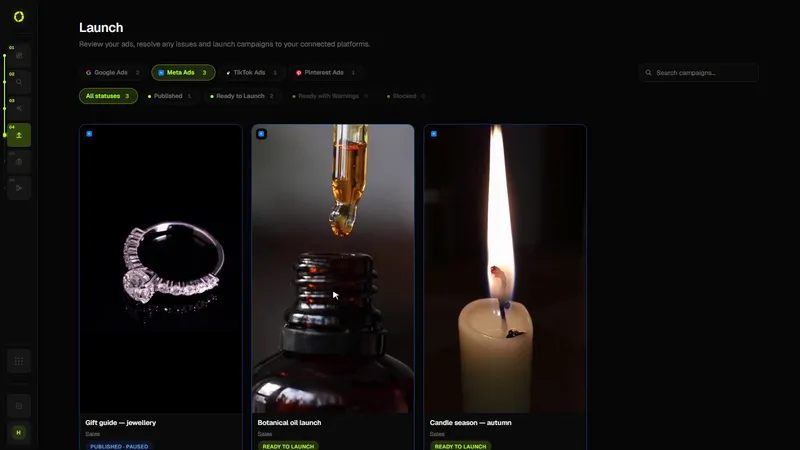
Everything you create lands here as a draft. Launch checks each one against what the platform needs, shows what blocks it, and publishes when you are ready.

LAUNCH: NEW CAMPAIGN
ObjectiveConversions
PlatformsGoogle · Meta · TikTok
Campaign Structure3 Campaigns · 9 Ad Sets
Creative AssetsGenerated
StatusReady to publish
How Launch Works

One prompt.
A complete campaign.

Drafts from Create are grouped by platform with their readiness: ready, ready with warnings, or blocked, and why. Nothing goes live until you launch it.

✓Describe your product
✓Choose goals & objectives
✓Select Google, Meta or TikTok
✓Generate campaign structure
✓Generate ad copy
✓Generate visual creative
✓Review before publishing
✓Publish to connected accounts
What You Get

Everything a campaign needs.
Generated together.

Each campaign is reviewed the way its platform expects it: structure, creative, destination and budget.

Drafts in one place
Every campaign you build in Create waits here, grouped by platform, until you launch it.
Readiness checks
Ready, ready with warnings, or blocked, with the exact reason and what to fix.
Every connected platform
Launch to Google Ads, Meta Ads, TikTok Ads or Pinterest Ads from one workflow.
Campaign Structure
Real ad sets and ad groups generated per platform, not a single flat campaign.
Creative Generation
Ad copy, visuals and platform-specific assets generated alongside the campaign itself.
Native Publishing
Review and publish directly to your connected ad accounts, no manual re-entry.
How it works

Check every campaign before it reaches the platform

Launch is the step between a draft and a live campaign. It shows what each platform will receive, flags what’s missing, and creates the campaign through the platform’s official API, paused.

  1. Pick a draft. Every campaign from Create waits in Launch with its readiness status.
  2. Review the settings. Objective, countries, languages, ages, placements, budget, conversion tracking, destination and tracking parameters, each marked as your choice, from your business profile, automatic, or missing.
  3. Fix what’s flagged. For example: choose a country, set a daily budget, select your Meta Pixel or Pinterest tag, confirm Meta’s special ad categories, or add a logo for Performance Max.
  4. Confirm. A summary shows exactly what will be created. Nothing is sent until you confirm.
  5. It’s created paused. Campaign, ad sets or ad groups and ads are created on the platform paused. You switch them on in the platform.
The OrivenAI Launch screen with campaign drafts and readiness checks
The Launch screen. Screenshot from the product.

Who it’s for

  • Anyone who wants a second pair of eyes before spending money
  • Businesses running the same campaign on more than one platform
  • Teams that want publishing to be a deliberate step

Good to know

  • You always set the budget and the countries; OrivenAI never fills them in for you
  • Sales and Leads campaigns need conversion tracking on the platform (Pixel, tag or conversion actions)
  • If a platform rejects part of a campaign, everything created in that attempt is removed
  • Each platform still reviews ads under its own policies

Questions

Will my campaign start spending right away?

No. Campaigns are always created paused. Nothing spends until you activate the campaign in the ad platform.

What if I publish the same campaign twice?

Launch prevents a second publish of the same campaign while one is in progress.

Which campaign types can I launch?

Google Search, Performance Max and Demand Gen; Meta image ads; TikTok video ads for traffic and awareness; Pinterest image and video Pins.

Your next campaign
starts with one prompt.

Generate a complete, ready-to-publish campaign in minutes.

Get Started
Campaigns

Every campaign.
One workspace.

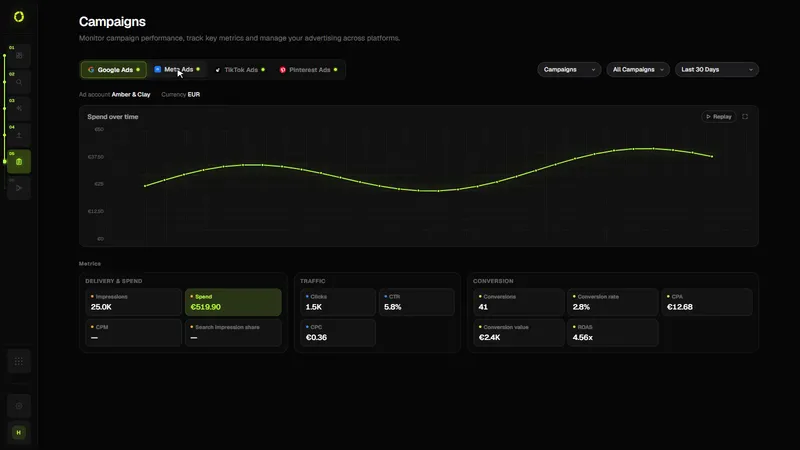
Follow spend, delivery, traffic and conversions for your live campaigns across Google, Meta, TikTok and Pinterest, by platform, campaign and date range.

CAMPAIGNS
Summer Sale · MetaLive
Search Brand · GoogleLive
UGC Launch · TikTokDraft
Q3 Retarget · MetaIn Review
Preview · Edit · PublishWorkspace
The Campaign Workspace

Nothing gets lost.
Nothing gets rushed.

Pick a platform, a campaign and a date range. Every number comes straight from the platform, and anything a platform does not report says so.

✓See all live campaigns
✓Resume drafts anytime
✓Open the campaign workspace
✓Preview ads before publishing
✓Edit copy, creative and structure
✓Review before it goes live
✓Publish to connected accounts
✓Track status across platforms
What You Get

From draft to live.
Without losing track.

Delivery, traffic and conversion metrics side by side, with spend over time where the platform provides it.

Campaign Overview
See every connected platform's campaigns in one workspace.
Live Campaigns
Track status, spend and performance for everything currently running.
Grouped metrics
Delivery, traffic and conversion metrics grouped so related numbers read together.
Campaign Workspace
Open any campaign to review structure, creative and settings in detail.
Honest by platform
Where a platform reports less, such as account-level data, Campaigns shows that instead of guessing.
Publishing
Push campaigns live to your connected accounts directly from Oriven.
How it works

See every platform’s results in one place

Campaigns pulls performance directly from each connected ad platform, so you can compare campaigns without switching between four dashboards.

  1. Connect your ad accounts. Google Ads, Meta Ads, TikTok Ads and Pinterest Ads, in Control Center.
  2. Choose a view. Filter by platform, campaign and date range; read spend, clicks, conversions and the other metrics each platform reports.
  3. Act on what you see. Pause or resume Google Ads, Meta Ads and Pinterest Ads campaigns from OrivenAI, with a confirmation first.
  4. Automate what repeats. Turn a check you do every week into an automation rule.
The OrivenAI Campaigns screen with performance by platform, campaign and date range
The Campaigns screen. Screenshot from the product.

Who it’s for

  • Businesses advertising on two or more platforms
  • Owners who want a quick, honest view of what’s running
  • Marketers who report across platforms

Good to know

  • Numbers come from each platform’s own reporting, so definitions differ between platforms
  • Data refreshes from the platforms; very recent activity can lag
  • Pausing in OrivenAI pauses the real campaign on the platform

Questions

Are the numbers estimates?

No. They are read from each platform’s reporting API. OrivenAI doesn’t invent or blend metrics across platforms.

Can I pause campaigns from OrivenAI?

Yes, for Google Ads, Meta Ads and Pinterest Ads campaigns, after a confirmation. TikTok campaigns are managed in TikTok Ads Manager.

Keep every campaign
in one place.

Live, in review, or still a draft: always where you left it.

Get Started
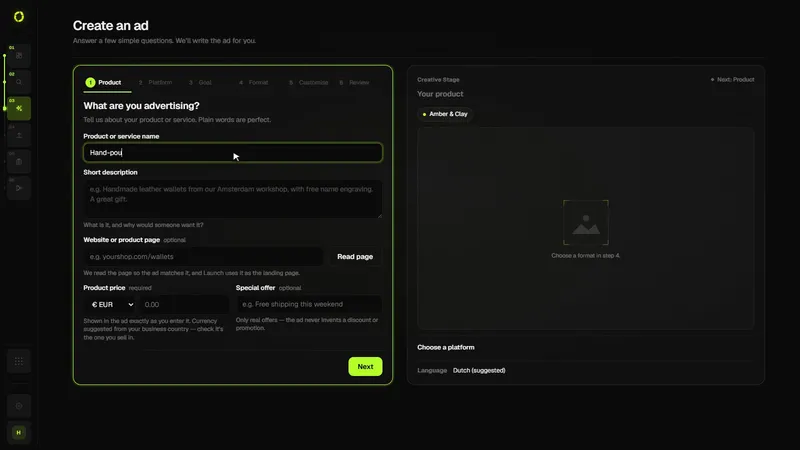
Create

Turn a prompt into
a ready-to-launch ad.

The Creative Playground turns a product description into platform-ready ad creative, image or video, informed by your real Business and Brand context.

CREATE: CREATIVE PLAYGROUND
PlatformGoogle Ads
Campaign GoalSales
Brand IdentityOn
Creative StageReady
How Create Works

One prompt.
A finished ad.

Describe what you're advertising. Create builds the copy and the visual together, matched to the platform you're launching on.

✓Describe your product in one prompt
✓Choose your platform and campaign goal
✓Generate image ads or video ads
✓Informed by your Business and Brand context
✓Attach a product photo for context
✓Review on the Creative Stage before you launch
What You Get

Built for the platform.
Grounded in your brand.

Every ad Create generates is shaped by the platform it's for and the business behind it.

Prompt-First Creation
Describe what you're advertising once. Create turns it into platform-ready ad copy and visuals.
Image & Video Ads
Generate image ads or video ads, matched to the platform you're launching on.
Creative Stage
Watch your ad take shape as it generates. Real progress, not a generic spinner.
Connected business context
Every generation draws on your Business profile and Brand Identity, so it actually sounds like you.
Product & Reference Material
Attach a product photo or an existing image as context for what Create generates.
Page & Reference-Aware Generation
Point Create at your own product page, or an ad you find effective, for extra context. It reads the page and creates an original ad, never a copy.
How it works

From a short brief to a ready-to-review campaign

Create turns what you know about your product into a complete draft for one ad platform: the campaign structure, the copy for every ad, and the image or video creative, in the format that platform expects.

  1. Describe what you advertise. A product, an offer, who it’s for. Your business profile from Control Center (name, brand, website) is added automatically, and you can bring in findings from Research.
  2. Choose a platform, goal and format. Google Ads, Meta Ads, TikTok Ads or Pinterest Ads; Sales, Leads, Traffic or Awareness; image or video; and how many ad sets or ad groups and ads you want.
  3. Review the draft. Headlines, primary text, descriptions and calls to action for each ad; for Google Search, keywords, negative keywords, callouts and sitelinks. Every field is editable and shows a character counter.
  4. Generate the creative. One image or video per ad slot, sized for the platform. You can attach your own image or product photo instead.
  5. Send it to Launch. Nothing is published from Create. Launch checks the campaign and creates it on the platform paused.
The OrivenAI Create screen: the brief, platform choice (Google, Meta, TikTok, Pinterest), image or video, campaign goal, campaign type and structure, and the creative stage
The Create screen. Screenshot from the product.

Who it’s for

  • Small businesses and solo marketers who need ads for more than one platform
  • Teams that want a consistent first draft instead of a blank page
  • Anyone who wants to test several angles quickly

Good to know

  • A campaign draft uses 25 credits; each image 75 and each video 200 (credits are refunded if generation fails)
  • Videos take a few minutes and keep generating if you leave the page
  • TikTok ads need video; the other platforms accept images
  • AI drafts are a starting point: check claims, prices and offers before publishing

Questions

Can I use my own images?

Yes. Attach an image or a product photo and Create uses it instead of generating one for that slot, so no image credits are spent on it.

Does Create publish my ads?

No. Create prepares the campaign; Launch checks it and creates it on the ad platform paused. You switch it on in the platform when you’re ready.

Which languages can I advertise in?

You write the brief in the language you want the ads in, and you can set the campaign’s target languages in its settings.

Stop starting from
a blank page.

Describe your product. Create builds the ad.

Get Started
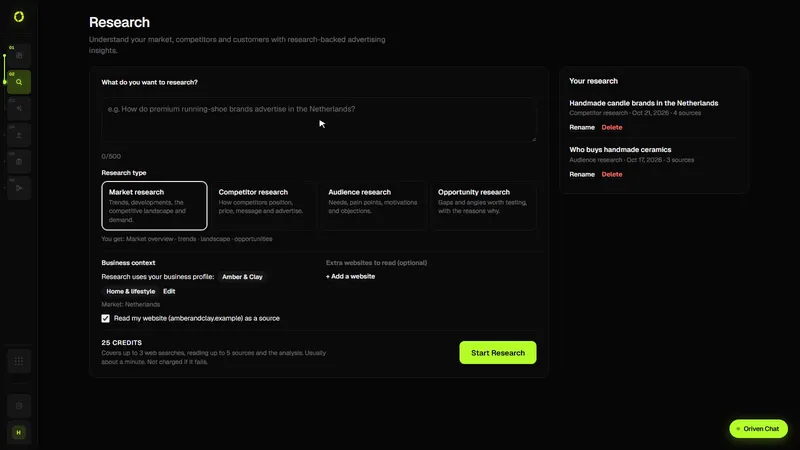
Research

Know what works
before you spend.

Research helps you understand creative approaches, messaging patterns and advertising trends outside your own campaigns, so you can test the right ideas, not guess.

RESEARCH: CREATIVE PATTERNS
Problem → SolutionRecurring pattern
Product DemonstrationRecurring pattern
Messaging: Time savedCommon
Sources3 web sources
How Research Works

Evidence, not guesses.

Ask a real advertising question. Research answers with calibrated, source-attributed patterns, never fabricated results.

✓Creative approach patterns
✓Messaging & hook patterns
✓Competitor advertising context
✓Emerging advertising trends
✓Connected to your real Business context
✓Always shows its sources
What You Get

Real questions.
Honest answers.

Research never claims a pattern "works" without evidence, and always tells you where an idea came from.

Ask a question
"How do competitors in my market position and price?" A real question, a report built for it.
Creative & messaging patterns
Recurring approaches and hooks, named clearly, never invented case studies.
Source transparency
Real links to Meta Ad Library, Google Ads Transparency Center, TikTok Creative Center and Pinterest Trends.
Connected to your business context
Findings are related to your real brand context, when you've set it up.
A library of your research
Every report is saved to your account. Reopen, rename or delete it, and send chosen insights to Create.
Never fabricated
Calibrated language throughout: observation, not invented performance claims.
How it works

Research your market before you spend

Research answers questions like “Who are my main competitors and what do they advertise?” with a structured report you can act on, and shows which findings were checked against a source.

  1. Ask a question and choose a research type. Market, competitor, audience or opportunity research — each searches for different things and returns its own report. Add competitor pages if you want them read too.
  2. OrivenAI gathers evidence. Up to three targeted web searches using your industry and country, then it reads up to five of the most relevant pages, your own website and any pages you attached.
  3. Get a structured report. An executive summary with the key conclusions, then sections that fit the research type: competitor cards and a comparison, customer needs and objections, trends, or opportunities with suggested tests.
  4. See what each finding rests on. Findings are labelled Source-checked (a quoted passage was found in a page it read), Cited (a source was named but not checked), Analysis, or Idea to test. Source-checked findings show the quoted passage and the link.
  5. Use it. Reports are saved to your Research library. Add up to eight insights to Create as context for your next campaign.
The OrivenAI Research screen: a research question, research types and the business profile used as context
The Research screen. Screenshot from the product.

Who it’s for

  • Businesses planning a first campaign in a new market
  • Marketers who want competitor context before writing ads
  • Anyone who needs evidence, not just AI opinions

Good to know

  • Included from the Starter plan; each report uses 25 credits (refunded if it fails)
  • It has no access to competitors’ ad performance, budgets or results, and never claims an ad “works”
  • It doesn’t pull ads from the Meta Ad Library or Google Ads Transparency Center; it links to them so you can check real ads
  • Set your country in your business profile so findings are specific to your market

Questions

Is Research based on real data?

It runs live web searches and reads the most relevant pages, your website and any pages you attach. A finding is only marked Source-checked when the passage it quotes was found in a page it read; everything else is marked Cited, Analysis or Idea to test.

Can it show how my competitors’ ads perform?

No. No tool has access to another advertiser’s results. Research describes what competitors publicly do and say, and suggests what to test.

Where are my reports kept?

In your account, in your Research library, so you can reopen, rename or delete them on any device.

Stop guessing.
Start researching.

Understand what's working in advertising before you spend on it.

Get Started
Automations

Automate your
advertising workflows.

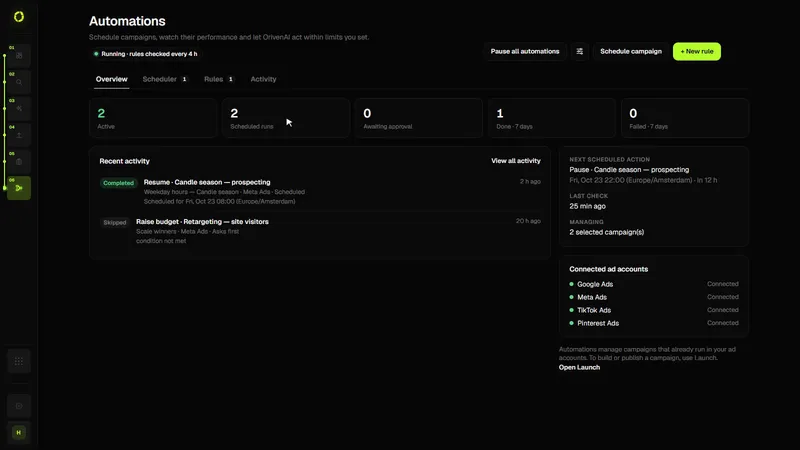
Schedule campaigns, monitor performance, and manage advertising actions with reliable, rule-based automations.

AUTOMATIONS
Active automations2 active
Business hours (Mon–Fri, 09:00–18:00)Scheduled
Pause when CPA is above €40Asks first
Next scheduled actionMon 09:00
Awaiting approval1
How Automations Work

You set the rules.
Automations follow them.

Automations act on the same performance data your campaigns report, but only within the schedules and rules you've explicitly turned on.

✓Rules per campaign or for a whole account
✓Schedules in your own time zone
✓Maximum budget and change limits
✓Enable or disable any rule, anytime
✓Full activity log of actions taken
✓Built on your campaign performance data
✓Runs on OrivenAI’s servers, also when you’re offline
✓Nothing acts without a rule in place
What You Get

Routine work that doesn't
wait for you to log in.

Automations only do what you've told them to, with a full record of everything they've done.

Schedules and rules
Switch campaigns on and off at set times, or act when a condition you chose is met.
Approval or automatic
Each rule notifies you, asks for your approval or acts on its own within the limits you set, only after you confirm it may.
Clear conditions
Conditions on real metrics such as CPA, ROAS, CTR or conversions. Missing data is never treated as zero.
Activity log
See exactly what each automation did and when, with the values before and after.
Enable or Disable Anytime
Turn any automation on or off, or pause all of them at once, whenever you want.
Built on campaign data
Automations read the same platform-reported numbers you see in Campaigns. Nothing hidden.
How it works

Rules you can read, actions you can predict

Automations are schedules and rules for campaigns that already run in your ad accounts: you decide the condition or the time, the action and the limits, and every action is logged.

  1. Write a rule. A condition on a metric such as CPA, ROAS, CPC, CTR, conversions or spend, for example “if CPA is above €40 over 7 days”.
  2. Choose the action and its limits. Pause or resume a campaign, adjust its budget within a range you set, notify you, or ask for your approval first.
  3. Checked for you, also when you’re offline. Schedules run at the time you set in your time zone, and rules are checked regularly on OrivenAI’s servers. Budget rules have a maximum budget and limits on how often and how much they change.
  4. Review what happened. Every run and action is recorded, so you can see why something changed.
The OrivenAI Automations screen with automation rules
The Automations screen. Screenshot from the product.

Who it’s for

  • Advertisers who check the same numbers every day
  • Small teams that can’t watch campaigns around the clock
  • Anyone who wants automation they can explain

Good to know

  • Included from the Starter plan; creating an automation costs 50 credits once, its checks and changes are free
  • Works with the campaigns in your connected ad accounts; shared and lifetime budgets are never changed
  • Rules only do what you wrote; no AI decides what happens
  • Approval mode lets you confirm each change before it happens

Questions

Can an automation spend more than I want?

A rule can only raise a budget up to the maximum you set, by at most the percentage you allow, and only after you confirm it may act on its own. You can also require approval before any change.

How is this different from Google’s automated bidding?

Smart Bidding sets bids inside a campaign. Automations act on whole campaigns (switch on, pause, resume, budget) at times or on conditions you choose, across your connected ad accounts.

Set the rules once.
Let Automations handle it.

Included from the Starter plan.

Get Started
Control Center

One brain, behind
every generation.

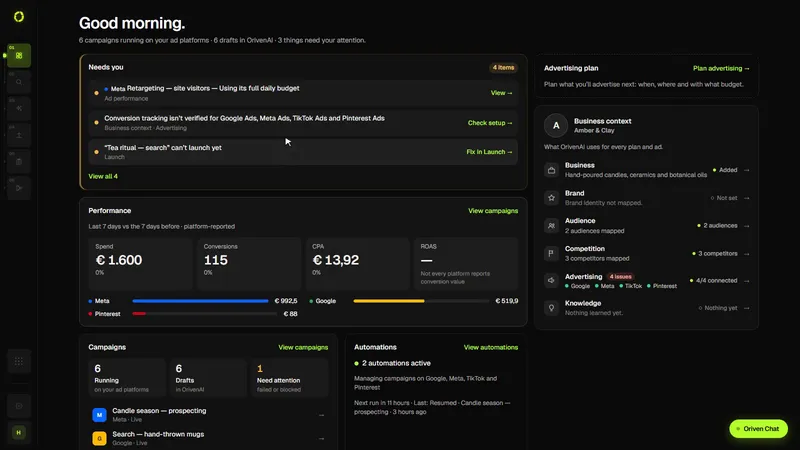
Control Center keeps your business profile and Brand Identity next to your advertising overview and plan, so every campaign, copy and creative starts from the same context and actually sounds like you.

BUSINESS: BRAND IDENTITY
Brand IdentityTrained
Brand VoiceConfident · Direct
Business ProfileComplete
Workspace3 team members
Connected Platforms3 / 3
How Business Works

Set the context once.
Every AI feature uses it.

Your business profile isn't a settings page nobody reads. It's what makes every generated campaign sound like it actually came from your brand.

✓Build your business profile
✓Train your Brand Identity
✓Define your brand voice
✓Store brand information & assets
✓Configure your workspace
✓Manage your team
✓Feeds Launch, Campaigns & Automations
✓One profile, every AI feature
What You Get

Context that carries
across the whole platform.

Set up your business once. It's what every other Oriven product builds on.

Business Profile
Core information about your business that powers every AI generation.
Brand Identity
Oriven's memory of your brand: voice, positioning and product context.
Brand Voice
Define tone and style so generated copy sounds like you, not generic AI.
Brand Information
Keep logos, colors and brand assets organized in one place.
Advertising overview
Performance, what needs you, campaign and automation state, and your advertising plan in one place.
Business Context
Business-level context that feeds Research and Launch alike.
How it works

One profile that every campaign draws on

Control Center holds what OrivenAI should know about your business, so Research, Create and Launch use the same facts instead of you re-typing them.

  1. Add your business profile. Name, website, industry, country, products, audiences and competitors.
  2. Set your brand identity. Logo, colours and tone of voice, used when copy and creative are generated.
  3. Connect your ad accounts. Google Ads, Meta Ads, TikTok Ads and Pinterest Ads, through each platform’s official sign-in.
  4. Let the other modules use it. Research uses your country and website; Create uses your brand; Launch uses your country and business name as defaults you can change.
The OrivenAI Control Center with the business profile, brand identity and connected ad accounts
Control Center. Screenshot from the product.

Who it’s for

  • Every OrivenAI user: it’s where setup happens
  • Businesses with more than one ad platform to connect

Good to know

  • Your country matters: it’s used as the default market for research and campaigns, and OrivenAI never assumes one
  • Disconnecting an ad account doesn’t pause campaigns already running on it

Questions

Can I target a different country for one campaign?

Yes. Your profile’s country is only the default; you can choose other countries for any campaign before it’s published.

Do I need to connect every platform?

No. Connect only the platforms you advertise on.

Give your AI
the full picture.

One business profile. Every product builds on it.

Get Started
Case Studies

How Oriven replaces
manual advertising workflows.

These are illustrative examples of how Oriven changes a real advertising workflow, not verified customer results. Real customer case studies will appear here as they become available.

Illustrative example

A solo founder running ads
across three platforms.

The challenge. Creating and managing ads across Google, Meta and TikTok meant three separate logins, three different ad formats to prepare, and no single view of what was actually working.

−Before: separate tools for creative, publishing and reporting per platform
−Before: manual copy/paste of performance numbers into a spreadsheet
−Before: creative decisions made without a clear view of what was already working
✓With Oriven: one workspace to create and publish across all three platforms
✓With Oriven: campaign performance in one place, no manual reporting
✓With Oriven: new creative decisions informed by real performance data

Outcome: qualitative. A single, centralized advertising workflow replacing several disconnected tools. No verified numerical result is claimed for this illustrative example.

Illustrative example

A small agency managing
advertising for several clients.

The challenge. Every client meant a new set of ad accounts, a new creative process, and manual status updates before each client call.

−Before: switching between client accounts across multiple platform dashboards
−Before: rebuilding the same creative process manually for each client
−Before: preparing status updates by hand before every client call
✓With Oriven: campaign management for every connected account from one workspace
✓With Oriven: a repeatable creative workflow instead of starting from scratch each time
✓With Oriven: real campaign performance ready to review at any time

Outcome: qualitative. Less time spent switching tools and preparing updates, more time on strategy. No verified numerical result is claimed for this illustrative example.

See it for yourself.

Connect an account and create your first campaign.

Get Started
FAQ

Questions,
answered.

Everything you need to know before connecting your ad accounts.

Oriven is one workspace for advertising, in six steps: Control Center for what is happening, what needs you and what is planned, with your business context; Research to investigate a market; Create to build platform-ready ads; Launch to review and publish them; Campaigns to follow performance; and Automations for schedules and rules that act within your limits.
Credits are Oriven's shared monthly usage balance. A complete image ad costs 100 credits, a video ad 225, a chat message 5. They're spent from one pool across every usage-based feature, not a separate allowance per feature.
It depends on your plan and how you split your credits. Starter's 1.000 credits/month is enough for roughly 10 image ads or 4 video ads if used entirely on one type. Fewer if you also spend credits on Research or other usage. There's no separate ad limit beyond your credit balance.
Free covers a limited workflow: Control Center, Create, Launch and Campaigns. Starter adds Research and Automations for the full advertising workflow. Creator adds Oriven Chat and in-app notifications. Professional adds Priority Support and a Weekly AI Performance Report by email (coming soon). See the full breakdown on Pricing →
Google Ads, Meta Ads (Facebook & Instagram), TikTok Ads, and Pinterest Ads. Every integration uses OAuth. You never share your passwords with Oriven, and we never store your credentials.
Yes. Connect your existing Google Ads, Meta Ads, TikTok Ads or Pinterest Ads accounts and manage the campaigns already running on them from Oriven. You don't need to start from scratch.
Research helps you understand your market, competitors and customers before you advertise: market, competitor, audience or opportunity research, each with its own report. It reads real pages and shows which findings were checked against a source, so you always know what's established versus an idea to test. Included from Starter.
Automations let you schedule your published campaigns, like switching them on during business hours, and set rules like "if CPA is above €25 over 7 days, lower the budget by 15%". Each rule either notifies you, asks for your approval or acts within the limits you set. Included from Starter. Every automated action runs within a schedule or rule you explicitly turned on: nothing acts without one in place.
Control Center is where you start: what is happening in your advertising, what needs you, what is planned next, and your business profile and Brand Identity (voice, positioning and product context), so every campaign, ad and piece of copy sounds like your brand.
Connecting an account (via OAuth, so Oriven never sees your password) lets Oriven pull real campaign, spend and performance data from that platform and publish campaigns you create back to it, all from one workspace instead of switching platforms.
No. Your campaigns still run on each platform's own ad system. Oriven connects to your existing accounts and brings the research, creative, launch, campaign management and optimization work into one workspace on top of them.
Some platform-side steps (like a platform's own account verification or ad-account creation flow) happen on that platform, outside Oriven. Oriven will guide you to what's needed rather than claim to complete it for you automatically.
You can start creating without a credit card, and your first full campaign generation is free before you need to choose a plan. Cancel anytime once you're subscribed.

Still have questions?

Reach out and we'll help you get started.

Contact Us

Simple pricing

Every plan includes Control Center, Create, Launch and Campaigns. From Starter you get the complete workflow, Research and Automations included. Credits are used the same way on every plan.

Compare plans

What each plan includes

Every plan uses the same product. Plans differ in how many credits you get and which modules are included. Prices are per month in euros.

FeatureFree
Free
Starter
€9.95 / month
Creator
€19.95 / month
Professional
€34.95 / month
Credits10 credits a day1,000 credits a month2,500 credits a month4,000 credits a month
Advertising workflowLimitedFullFullFull
Google Ads, Meta Ads, TikTok Ads and Pinterest Ads✓✓✓✓
Oriven Chat——✓✓
In-app notifications——✓✓
Priority Support———✓
Weekly AI Performance Report (coming soon)———✓
NoteLimited: Control Center, Create, Launch and Campaigns. Full: all six steps, adding Research and Automations.

What things cost in credits

Campaign draft (copy and structure)25 credits
Image (per ad)75 credits
Video (per ad)200 credits
Research report25 credits
Oriven Chat message (Creator and Professional)5 credits
New automation (once; its checks and changes are free)50 credits

How credits work

  • The Free plan gets 10 credits a day; paid plans get a monthly allowance.
  • An image ad campaign typically uses 100 credits (draft plus one image); a video ad campaign 225.
  • If a generation fails, its credits are returned.

Good to know

  • You can start on Free and upgrade when you need Research, Automations or more credits.
  • Your ad spend is paid to the ad platforms directly; OrivenAI never charges ad budgets.
  • Campaigns are created paused, so nothing spends until you switch it on.

Ready to get started?

Connect an account and create your first campaign.

Get Started
404

Page Not Found

The page you're looking for doesn't exist or has been moved.

← Return Home




