Turn a prompt into
a ready-to-launch ad.
The Creative Playground turns a product description into platform-ready ad creative, image or video, informed by your real Business and Brand context.
One prompt.
A finished ad.
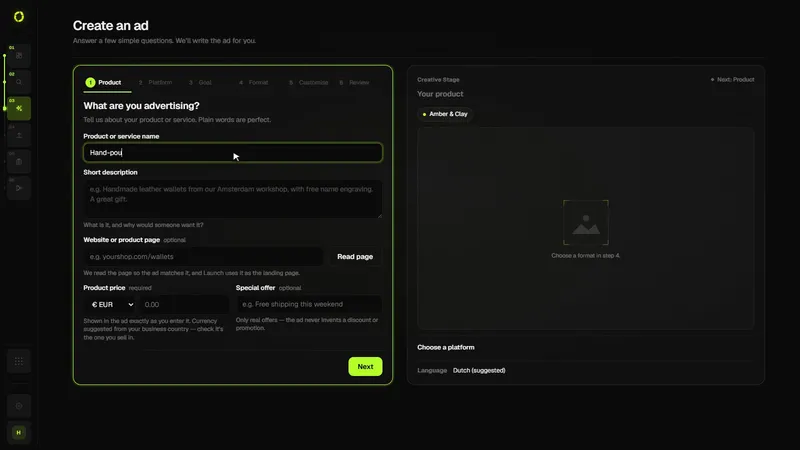
Describe what you're advertising. Create builds the copy and the visual together, matched to the platform you're launching on.
Built for the platform.
Grounded in your brand.
Every ad Create generates is shaped by the platform it's for and the business behind it.
From a short brief to a ready-to-review campaign
Create turns what you know about your product into a complete draft for one ad platform: the campaign structure, the copy for every ad, and the image or video creative, in the format that platform expects.
- Describe what you advertise. A product, an offer, who it’s for. Your business profile from Control Center (name, brand, website) is added automatically, and you can bring in findings from Research.
- Choose a platform, goal and format. Google Ads, Meta Ads, TikTok Ads or Pinterest Ads; Sales, Leads, Traffic or Awareness; image or video; and how many ad sets or ad groups and ads you want.
- Review the draft. Headlines, primary text, descriptions and calls to action for each ad; for Google Search, keywords, negative keywords, callouts and sitelinks. Every field is editable and shows a character counter.
- Generate the creative. One image or video per ad slot, sized for the platform. You can attach your own image or product photo instead.
- Send it to Launch. Nothing is published from Create. Launch checks the campaign and creates it on the platform paused.
Who it’s for
- Small businesses and solo marketers who need ads for more than one platform
- Teams that want a consistent first draft instead of a blank page
- Anyone who wants to test several angles quickly
Good to know
- A campaign draft uses 25 credits; each image 75 and each video 200 (credits are refunded if generation fails)
- Videos take a few minutes and keep generating if you leave the page
- TikTok ads need video; the other platforms accept images
- AI drafts are a starting point: check claims, prices and offers before publishing
Questions
Can I use my own images?
Yes. Attach an image or a product photo and Create uses it instead of generating one for that slot, so no image credits are spent on it.
Does Create publish my ads?
No. Create prepares the campaign; Launch checks it and creates it on the ad platform paused. You switch it on in the platform when you’re ready.
Which languages can I advertise in?
You write the brief in the language you want the ads in, and you can set the campaign’s target languages in its settings.
Related guidesCreating Facebook and Instagram ads with AIHow to test ad creativesAd character limits