AI helps online stores most with the work that scales with the size of the catalog: product imagery and short video, copy variations for each product and audience, and keeping seasonal campaigns fresh. Feed-based formats such as Google Shopping and Meta catalog ads remain essential for large catalogs. Pricing, claims, margins and which products to push stay human decisions.
An online store has a problem most other advertisers don’t: dozens or thousands of products, each needing images, copy and placement in campaigns, often changing with the seasons. That’s exactly the kind of repetitive, high-volume work AI is good at. This guide covers where AI genuinely helps e-commerce advertising, where the platforms’ own feed-based formats are better, and what to check before anything goes live.
Where AI helps an online store most
1. Product imagery beyond the white background
Most stores have clean packshots. Ads usually need more: the product in use, in a setting that matches the audience, in square, portrait and vertical formats. AI image generation can place your real product in different scenes, extend images to new aspect ratios and produce variations for testing, without a photo shoot for every product. Always start from real product photos, and check that colors, proportions, labels and details match exactly what the customer will receive.
2. Short product videos
Video tends to suit placements such as Reels, Stories and TikTok, but filming every product is expensive. AI can turn product images and a short script into simple product videos, which makes it realistic to test video for more of your catalog.
3. Copy for every product and audience
The same product can be sold on different benefits to different people: durability to one group, design to another, price to a third. AI makes it practical to write several angles per product and adapt them per platform: keyword-focused headlines for Google Search, a stronger hook for Meta, a casual voice for TikTok. Feed it your real product facts (materials, sizes, delivery times, guarantee) so it writes specifics instead of generic praise.
4. Seasonal and promotional campaigns
Black Friday, holidays, back-to-school and your own sales all need fresh creative on a deadline. AI shortens the gap between “we’re running a promotion” and “the ads are ready”, so you can launch earlier and test more versions.
Where feed-based formats do the job better
For large catalogs, the platforms’ own product formats remain the backbone of e-commerce advertising:
- Google Shopping and Performance Max with a product feed use your Google Merchant Center feed to show products, prices and images automatically.
- Meta catalog ads (Advantage+ catalog ads) use your Commerce Manager catalog to show each person relevant products, including people who already viewed them.
These formats depend on the quality of your feed: accurate titles, prices, availability and images. AI can help here too, for example by improving product titles and descriptions, but the feed itself is managed in Merchant Center and Commerce Manager. A healthy setup often combines both: feed-based campaigns for the catalog, and creative campaigns built around hero products, collections or offers.
A practical workflow for product ads
- Pick the products that deserve ads: best sellers, products with good margins and products with a clear reason to buy now.
- Collect real facts per product: price, key features, proof (reviews you’re allowed to quote, guarantees, certifications) and delivery terms.
- Generate a few angles per product and choose the strongest two or three.
- Create visuals from real product photos in the formats each placement needs.
- Check everything against the product page: price, availability, claims and images.
- Launch with tracking in place: purchase events firing correctly, ideally both browser and server-side. See Meta Pixel vs Conversions API.
- Test and refresh: replace creative before it wears out. See how to test ad creatives.
What to keep human
- Prices, discounts and claims. AI can misremember a price or invent a benefit; every claim needs checking.
- Margins and budget. Which products are worth advertising depends on numbers only you have.
- Product accuracy. Generated images must not change what the product looks like.
- Policies. Health, beauty, supplements and some other categories have extra advertising rules on every platform.
Measuring whether it works
Judge AI-made ads the same way as any other: cost per purchase, return on ad spend and new customers, measured over enough time to be meaningful. Use your store’s own order data as the reference, because each ad platform reports conversions with its own attribution rules. When you advertise on more than one platform, compare each with its own history; our guide to managing multiple ad platforms explains why.
How OrivenAI fits an online store
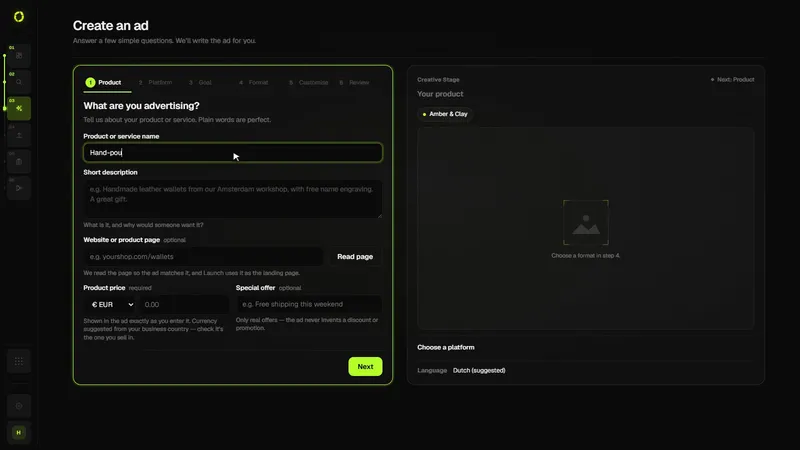
OrivenAI focuses on the creative campaign side. In Create, you can attach product photos and describe the product and offer; OrivenAI uses your store’s profile from Control Center to build a campaign with copy and image or video creative for Google Ads, Meta Ads, TikTok Ads or Pinterest Ads, which you publish to your own account through Launch. Research (from the Starter plan) helps you look at your market and competitors first.
To be clear about what it doesn’t do: OrivenAI doesn’t manage product feeds and doesn’t create Google Shopping or Meta catalog campaigns, which need Merchant Center and Commerce Manager. Many stores use both: feed-based campaigns for the catalog, and OrivenAI for creative campaigns around specific products and promotions.
Sources
Official documentation this guide relies on, last checked . Platforms change their rules often; check the source before you rely on a number.