Use the platforms’ free transparency tools (the Meta Ad Library, the Google Ads Transparency Center and the TikTok Creative Center) to see which ads your competitors run. Look for patterns in offers, angles, formats and landing pages rather than individual ads, write down what you observe, and use it to sharpen your own brief, not to copy.
You don’t need paid spy tools to see what your competitors advertise. The major platforms publish searchable libraries of ads, largely for transparency reasons, and they’re free to use. What separates useful research from scrolling is knowing what to look for and turning it into decisions about your own ads.
The free, official tools
Meta Ad Library
The Meta Ad Library lists ads currently running across Facebook, Instagram and Meta’s other apps. You can search by advertiser name or keyword and filter by country, platform and media type. For ads shown in the European Union it can show additional detail, and ads about social issues, elections or politics are kept in the library with spending information.
Google Ads Transparency Center
The Google Ads Transparency Center shows ads from verified advertisers across Google’s surfaces, such as Search, YouTube and the Display Network. You can search by advertiser or website and filter by region, format and date.
TikTok Creative Center (now TikTok One)
The TikTok Creative Center, now part of TikTok’s One Creative Suite, highlights top-performing ads and trending content, sounds and hashtags by region and industry. It’s less about one specific competitor and more about what works on TikTok in your category right now.
What to look for
Single ads tell you little. Patterns across many ads tell you a lot:
- Offers: discounts, free trials, bundles, guarantees, free delivery thresholds. What does the market expect?
- Angles: which problems and benefits competitors lead with, and which ones nobody uses.
- Formats: static images, carousels, video length, people on camera or product only.
- Longevity: ads that keep running for months are a hint that they work well enough to keep paying for. It’s a signal, not proof.
- Volume and timing: how many variations they run, and whether activity spikes around seasons or launches.
- Landing pages: click through. The page often reveals more of the strategy than the ad itself.
A simple research routine
- List five to ten competitors, including one or two outside your direct niche that sell to the same people.
- Search each in the relevant libraries for the platforms you use or plan to use.
- Record observations in a table: competitor, platform, offer, angle, format, how long it’s been running, landing page.
- Mark the patterns: what most do (the market’s baseline) and what nobody does (a possible opening).
- Write your conclusions as decisions: “Everyone leads with price; we’ll test leading with durability”, not “Competitor X has a nice video”.
- Repeat monthly, or before every major campaign.
Turning research into better ads
Research pays off when it changes your brief. Use what you found to choose an angle that stands out, set an offer that’s at least competitive, pick formats your category responds to, and decide what proof to show. Then test your own versions; see how to test ad creatives.
What not to do
- Don’t copy ads. Copying another brand’s creative, slogans or imagery can infringe their rights and makes you look like them. Learn the pattern, then make your own version.
- Don’t assume an ad works because it exists. Libraries show what runs, not results.
- Don’t over-index on one competitor. Look across the market.
How OrivenAI Research helps
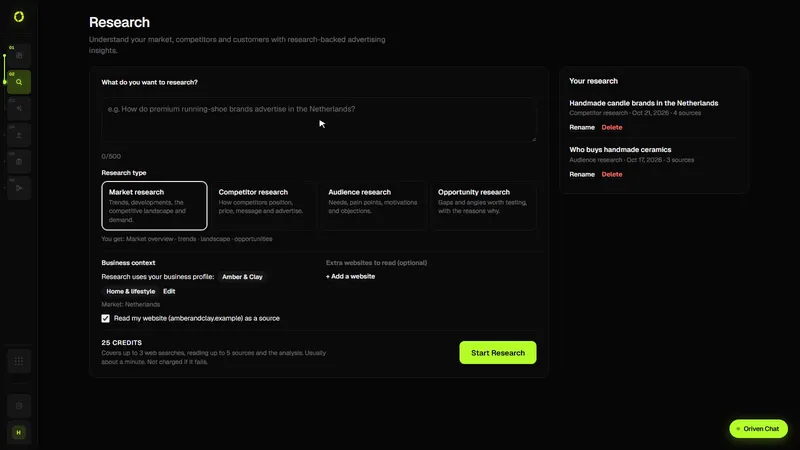
OrivenAI’s Research (from the Starter plan) does the first pass for you. You ask a question, for example “Who are my main competitors in the Netherlands and what do they advertise?”, and it runs targeted web searches using your industry and country, reads the most relevant pages, your own website and any competitor pages you attach. A competitor research report shows each competitor’s offering, positioning, public pricing and messaging side by side, plus differentiation opportunities to test. A finding is only marked Source-checked when the passage it quotes was found in a page it read; others are marked Cited, Analysis or Idea to test. It doesn’t pull ads from the Meta Ad Library, the Google Ads Transparency Center or TikTok’s tools, and it has no data on how competitors’ ads perform, so it links to those libraries for you to check the real ads. Reports are saved to your account, and you can send chosen findings to Create.
Sources
Official documentation this guide relies on, last checked . Platforms change their rules often; check the source before you rely on a number.