Start with the AI already built into Google Ads and Meta Ads, because it costs nothing extra. Add a creative tool if making ads is your bottleneck, a management or automation tool if keeping campaigns healthy is, and an all-in-one platform if switching between tools is what slows you down. Pick by the job you need done, not by the length of a feature list.
“AI advertising tool” covers very different products: some generate images, some write copy, some adjust bids, and some try to run the whole process. A small business rarely needs all of them. This guide sorts the main options by the job they do, explains what each is good and less good at, and ends with a short checklist for choosing. We make OrivenAI, which is one of the options below; we’ve tried to describe the others fairly and without guessing at details we can’t verify.
First, decide which job you need help with
Most small advertisers get stuck in one of four places:
- Making the ads. You know what to sell, but producing images, videos and copy for every platform takes days.
- Setting campaigns up. Objectives, audiences, ad sets and placements are confusing, so campaigns are launched half-configured.
- Keeping them healthy. Nobody checks budgets, fading ads or broken tracking until money has been wasted.
- Working across platforms. Google, Meta and TikTok each have their own tools, and the same work gets done three times.
Name your bottleneck before you compare tools. A creative generator won’t fix an account nobody monitors, and an automation tool won’t help if you have no ads worth running.
1. The AI built into the ad platforms
The cheapest AI advertising tools are the ones you already have. Both major platforms now automate a large part of delivery and increasingly help with creative:
Google Ads
Smart bidding sets bids per auction toward a goal such as a target cost per acquisition or return on ad spend. Performance Max campaigns choose placements across Google’s inventory, and Google Ads offers AI help to write headlines and descriptions and to generate image assets inside the campaign workflow.
Meta Ads
Meta’s Advantage+ options automate audiences, placements and budget distribution, and Ads Manager includes generative features such as text variations and image adjustments for Facebook and Instagram ads.
Good for: getting delivery right on each platform at no extra cost. Less good for: anything outside that one platform. Each network’s AI optimizes for its own results, doesn’t know your business beyond what you enter, and won’t help you work across platforms. Read more in Google Ads vs Meta Ads.
2. AI creative generators
These tools turn a product, a brand and a short description into ad images, banners, videos or copy. Well-known examples include AdCreative.ai, which focuses on generating ad creatives in many sizes, and design platforms such as Canva, which add AI features to a general-purpose editor with ad templates. General AI assistants are also widely used to draft ad copy.
Good for: producing many variations quickly, filling the formats each platform asks for, and getting past the blank page. Less good for: the campaign itself. You still have to set up campaigns, upload creative and track results elsewhere, and generic output needs editing so it sounds like your brand. If you’re comparing creative tools specifically, see our guide to AdCreative.ai alternatives.
3. Campaign management and automation tools
These tools sit on top of your ad accounts. They watch performance, flag problems and apply rules: pause an ad that costs too much, raise a budget that keeps hitting its cap, alert you when spend jumps. Examples include Optmyzr, which is built around Google Ads and Microsoft Ads management, and Madgicx, which focuses on Meta advertising. Many agencies also use rule engines and scripts.
Good for: accounts that already run several campaigns and lose money through slow reactions. Less good for: a business that hasn’t launched yet; there’s nothing to optimize. Rules also need limits. Our guides to PPC automation and automating Google Ads safely explain how to set them up without surprises.
4. All-in-one AI advertising platforms
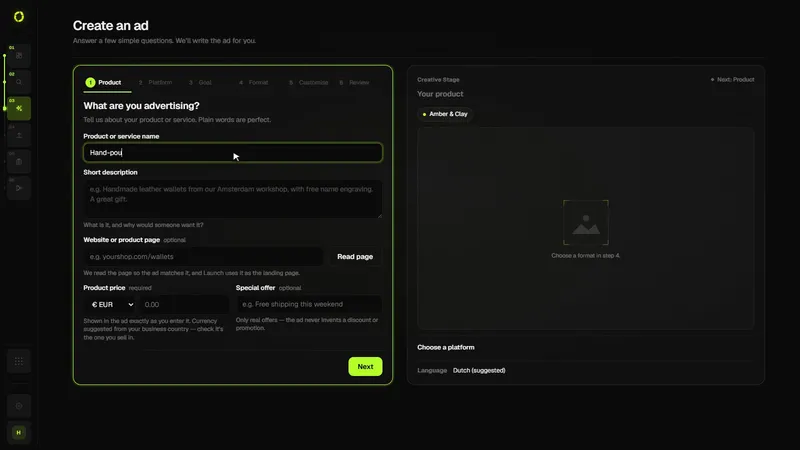
A newer group of tools tries to cover the whole loop: research, creative, campaign setup, publishing and follow-up, across several ad networks. The benefit is less switching and one business profile that every step uses. The trade-off is depth: a specialist tool may go further in its one area. We explain the category in What is an AI advertising platform?
OrivenAI is in this group. Concretely, it does the following today:
- Control Center holds your business, brand and audience context, which every other step uses.
- Research investigates a market, competitors and audiences and shows its sources (from the Starter plan).
- Create turns a short brief into a campaign in the chosen platform’s structure, with ad copy, targeting and image or video creative.
- Launch checks each draft’s readiness and publishes it to your own ad account through the platform’s official API.
- Campaigns shows results per platform, and Automations schedule campaigns and apply rules you set (from Starter).
It supports Google Ads, Meta Ads (Facebook and Instagram), TikTok Ads and Pinterest Ads. It doesn’t replace your analytics tool.
Comparison at a glance
| Type of tool | Best for | Watch out for |
|---|---|---|
| Built-in platform AI (Google, Meta) | Delivery and bidding on one platform, at no extra cost | Optimizes for its own platform only; knows only what you enter |
| Creative generators | Fast ad images, videos and copy in many sizes | Generic output; campaign setup and tracking happen elsewhere |
| Management and automation tools | Monitoring and rules for accounts that already spend | Need clear limits; little value before you launch |
| All-in-one platforms | One workflow from research to launch across several networks | Less depth than a specialist in any single area |
How to choose: a five-question checklist
- Which platforms do you actually advertise on? A tool that supports a network you don’t use adds nothing.
- Does it publish, or only produce files? If you’ll still upload everything by hand, count that time.
- Does it use your business context? Ads built from your offer, audience and brand voice need less editing.
- Can you control automation? Look for limits, approvals and a record of what changed.
- Can you start small? A free plan or trial lets you test on one real campaign before committing.
Whatever you choose, judge it by one real campaign over a few weeks, compared with your own sales data rather than the tool’s own dashboard.
A sensible starting stack for a small business
For most small businesses, a lean setup looks like this: the platform’s own bidding and placements for delivery, one tool for creating ads, and a fixed weekly routine for checking results. Add automation once you have campaigns worth protecting, and a second platform once the first is working. If you’d rather have the creative, setup and publishing steps in one place, OrivenAI’s Free plan includes Control Center, Create, Launch and Campaigns.
Sources
Official documentation this guide relies on, last checked . Platforms change their rules often; check the source before you rely on a number.