Every campaign.
One workspace.
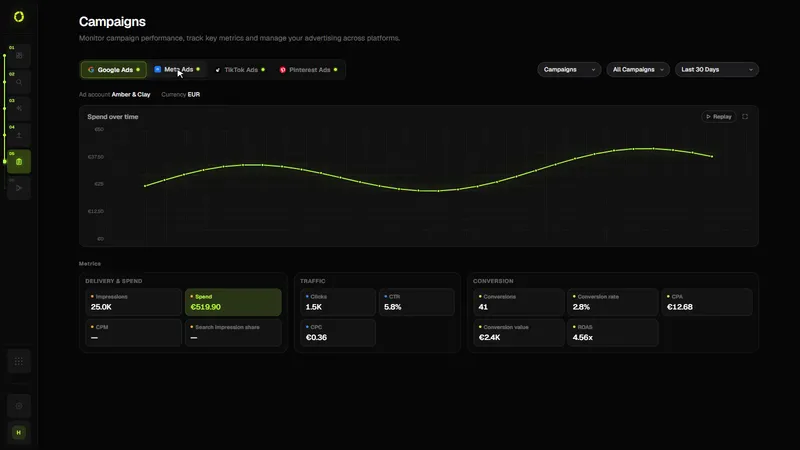
Follow spend, delivery, traffic and conversions for your live campaigns across Google, Meta, TikTok and Pinterest, by platform, campaign and date range.
Nothing gets lost.
Nothing gets rushed.
Pick a platform, a campaign and a date range. Every number comes straight from the platform, and anything a platform does not report says so.
From draft to live.
Without losing track.
Delivery, traffic and conversion metrics side by side, with spend over time where the platform provides it.
See every platform’s results in one place
Campaigns pulls performance directly from each connected ad platform, so you can compare campaigns without switching between four dashboards.
- Connect your ad accounts. Google Ads, Meta Ads, TikTok Ads and Pinterest Ads, in Control Center.
- Choose a view. Filter by platform, campaign and date range; read spend, clicks, conversions and the other metrics each platform reports.
- Act on what you see. Pause or resume Google Ads, Meta Ads and Pinterest Ads campaigns from OrivenAI, with a confirmation first.
- Automate what repeats. Turn a check you do every week into an automation rule.
Who it’s for
- Businesses advertising on two or more platforms
- Owners who want a quick, honest view of what’s running
- Marketers who report across platforms
Good to know
- Numbers come from each platform’s own reporting, so definitions differ between platforms
- Data refreshes from the platforms; very recent activity can lag
- Pausing in OrivenAI pauses the real campaign on the platform
Questions
Are the numbers estimates?
No. They are read from each platform’s reporting API. OrivenAI doesn’t invent or blend metrics across platforms.
Can I pause campaigns from OrivenAI?
Yes, for Google Ads, Meta Ads and Pinterest Ads campaigns, after a confirmation. TikTok campaigns are managed in TikTok Ads Manager.
Related guidesManaging multiple ad platformsHow to test ad creativesCross-platform ad management
Keep every campaign
in one place.
Live, in review, or still a draft: always where you left it.
Get Started