From idea to live campaign.
In minutes.
Everything you create lands here as a draft. Launch checks each one against what the platform needs, shows what blocks it, and publishes when you are ready.
One prompt.
A complete campaign.
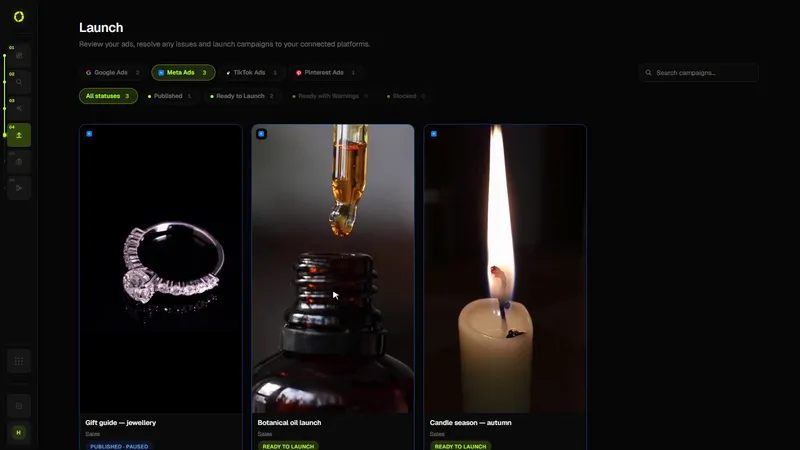
Drafts from Create are grouped by platform with their readiness: ready, ready with warnings, or blocked, and why. Nothing goes live until you launch it.
Everything a campaign needs.
Generated together.
Each campaign is reviewed the way its platform expects it: structure, creative, destination and budget.
Check every campaign before it reaches the platform
Launch is the step between a draft and a live campaign. It shows what each platform will receive, flags what’s missing, and creates the campaign through the platform’s official API, paused.
- Pick a draft. Every campaign from Create waits in Launch with its readiness status.
- Review the settings. Objective, countries, languages, ages, placements, budget, conversion tracking, destination and tracking parameters, each marked as your choice, from your business profile, automatic, or missing.
- Fix what’s flagged. For example: choose a country, set a daily budget, select your Meta Pixel or Pinterest tag, confirm Meta’s special ad categories, or add a logo for Performance Max.
- Confirm. A summary shows exactly what will be created. Nothing is sent until you confirm.
- It’s created paused. Campaign, ad sets or ad groups and ads are created on the platform paused. You switch them on in the platform.
Who it’s for
- Anyone who wants a second pair of eyes before spending money
- Businesses running the same campaign on more than one platform
- Teams that want publishing to be a deliberate step
Good to know
- You always set the budget and the countries; OrivenAI never fills them in for you
- Sales and Leads campaigns need conversion tracking on the platform (Pixel, tag or conversion actions)
- If a platform rejects part of a campaign, everything created in that attempt is removed
- Each platform still reviews ads under its own policies
Questions
Will my campaign start spending right away?
No. Campaigns are always created paused. Nothing spends until you activate the campaign in the ad platform.
What if I publish the same campaign twice?
Launch prevents a second publish of the same campaign while one is in progress.
Which campaign types can I launch?
Google Search, Performance Max and Demand Gen; Meta image ads; TikTok video ads for traffic and awareness; Pinterest image and video Pins.
Related guidesManaging multiple ad platformsMeta Pixel vs Conversions APIGoogle Ads vs Meta Ads
Your next campaign
starts with one prompt.
Generate a complete, ready-to-publish campaign in minutes.
Get Started