Give the AI a specific brief (offer, audience, proof and one action), choose the Meta objective that matches your goal, generate a few variations in the right formats for feed, Stories and Reels, edit them for accuracy and brand voice, and launch with a modest budget and working conversion tracking. AI speeds up the drafting; the decisions stay yours.
Meta ads run on Facebook and Instagram from the same Ads Manager account, which makes them a natural place to start using AI: one campaign can serve both apps, and the formats are well defined. The quality of what AI produces still depends almost entirely on what you give it and what you check before publishing. This guide walks through the process in order.
What you need before you start
- A Meta business setup: a Facebook Page, an ad account with a payment method and, for Instagram placements, a connected Instagram account.
- Conversion tracking if you want sales or leads: the Meta Pixel on your site, ideally with the Conversions API as well. See Meta Pixel vs Conversions API.
- A landing page that matches the ad: the same offer, price and wording the ad promises.
- Your raw material: product photos, logo, brand colors and a few facts customers care about.
Step 1: Write a brief the AI can work with
Vague input produces generic ads. A good brief fits in five lines:
- Offer: what you sell and the specific promotion, if any.
- Audience: who it’s for, in plain words (“new parents in Amsterdam who cycle to work”).
- Problem and promise: what changes for them.
- Proof: something true and checkable, such as a guarantee, a material or a delivery time.
- Action: the one thing you want them to do.
Compare “Ads for my coffee subscription” with “Freshly roasted specialty coffee delivered every two weeks, for home-office workers in the Netherlands who are tired of supermarket beans; roasted within 48 hours of shipping; pause or cancel anytime; goal: start a subscription.” The second gives the AI everything it needs to write something specific.
Step 2: Choose the right objective
Meta asks for a campaign objective, and its delivery system optimizes for it, so choose it deliberately:
- Sales: purchases on your site or shop; needs working conversion tracking.
- Leads: sign-ups or form submissions, on your site or in an instant form.
- Traffic: visits to a page; useful for content, less so for sales.
- Awareness: reach and recall; useful for launches and local businesses.
Meta also offers Engagement and App promotion objectives. If your real goal is sales, resist choosing Traffic because it looks cheaper: you’ll get clicks from people who are less likely to buy.
Step 3: Generate copy for each part of the ad
A Facebook or Instagram ad has several text fields, and each does a different job:
- Primary text: the message above the image. The first line matters most, because longer text is cut off.
- Headline: a short line next to the call-to-action button, usually the offer.
- Call to action: a button such as Shop now, Sign up or Learn more.
Ask the AI for several angles rather than one polished version: one focused on the problem, one on the product’s proof, one on the offer. Different angles teach you more than near-identical rewrites. Then edit: remove claims you can’t back up, check prices and dates, and make sure it sounds like your business.
Step 4: Create visuals in the right formats
Facebook and Instagram show ads in different shapes depending on placement:
- Feed: square (1:1) or portrait (4:5) images and videos work best.
- Stories and Reels: full-screen vertical (9:16), with key text away from the top and bottom edges where the interface covers it.
AI image and video generation is useful here: you can produce on-brand scenes around your product, variations for each format and short videos without a shoot. Start from real product photos where you can, so the product looks exactly like what customers receive. Check every generated image for errors in the product, text and hands before using it.
Step 5: Decide on audience and placements
Meta’s audience tools are increasingly automated. For most small businesses, a broad audience defined by location, age and language, combined with good creative, works better than narrow interest stacking, because the delivery system finds buyers from the people who respond. Placements can be automatic (Advantage+ placements) or chosen manually; if your creative only exists in one shape, choose placements that fit it, or create the missing formats.
Step 6: Review before you publish
Before anything goes live, check:
- Every claim is true, and prices match the landing page.
- The ad follows Meta’s advertising standards, especially for health, finance, housing and other sensitive categories.
- The link, tracking parameters and conversion event are correct.
- The budget and schedule are what you intend.
Step 7: Launch small, then learn
Start with a budget you can afford to learn with, run two or three different angles, and give them enough time to deliver before judging. Then keep the angle that works and test new variations against it; our guide to testing ad creatives explains how.
How the same steps work in OrivenAI
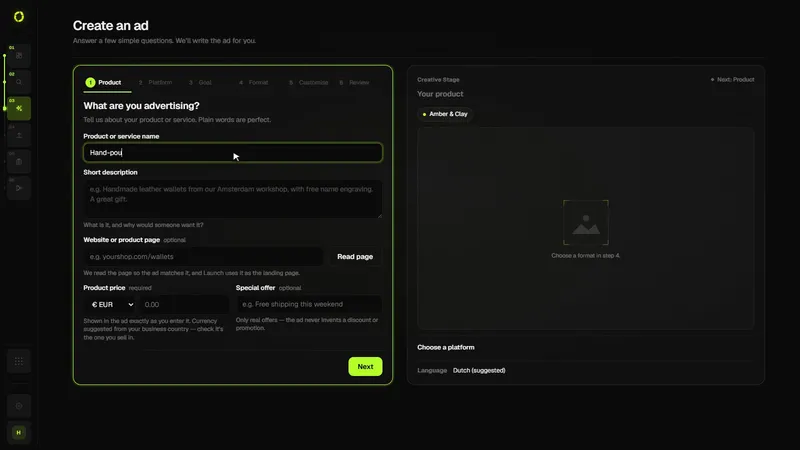
OrivenAI follows this process with less manual setup:
- Describe your business once in Control Center: offer, audience, brand voice and visual identity.
- In Create, write a short brief, choose Meta and a goal (Sales, Leads, Traffic or Awareness), and pick image or video. You can attach product photos and choose placements: Facebook and Instagram, or Instagram only.
- OrivenAI builds the campaign in Meta’s structure (campaign, ad sets and ads), with primary text, headlines, calls to action and image or video creative for each ad.
- Launch shows whether the draft is ready, for example whether your Meta ad account is connected, and publishes it to your own account through Meta’s API.
- The campaign is created paused, so you can review it in Ads Manager and switch it on when you’re ready. Results then appear in Campaigns.
See OrivenAI for Meta Ads for details.
Sources
Official documentation this guide relies on, last checked . Platforms change their rules often; check the source before you rely on a number.