Automate your
advertising workflows.
Schedule campaigns, monitor performance, and manage advertising actions with reliable, rule-based automations.
You set the rules.
Automations follow them.
Automations act on the same performance data your campaigns report, but only within the schedules and rules you've explicitly turned on.
Routine work that doesn't
wait for you to log in.
Automations only do what you've told them to, with a full record of everything they've done.
Rules you can read, actions you can predict
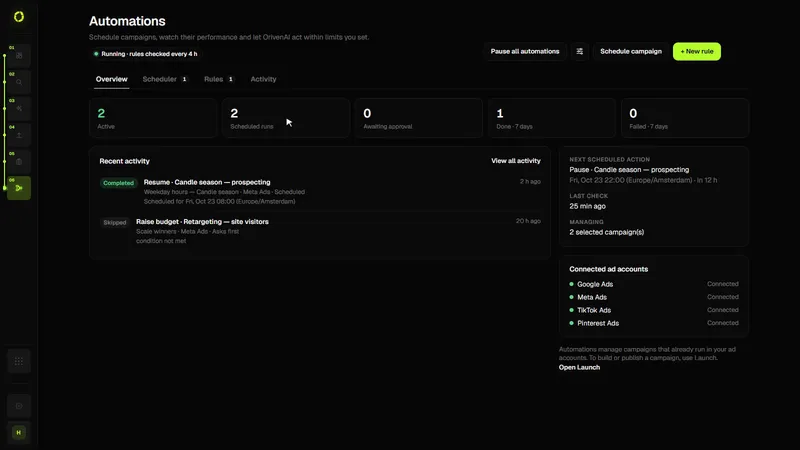
Automations are schedules and rules for campaigns that already run in your ad accounts: you decide the condition or the time, the action and the limits, and every action is logged.
- Write a rule. A condition on a metric such as CPA, ROAS, CPC, CTR, conversions or spend, for example “if CPA is above €40 over 7 days”.
- Choose the action and its limits. Pause or resume a campaign, adjust its budget within a range you set, notify you, or ask for your approval first.
- Checked for you, also when you’re offline. Schedules run at the time you set in your time zone, and rules are checked regularly on OrivenAI’s servers. Budget rules have a maximum budget and limits on how often and how much they change.
- Review what happened. Every run and action is recorded, so you can see why something changed.
Who it’s for
- Advertisers who check the same numbers every day
- Small teams that can’t watch campaigns around the clock
- Anyone who wants automation they can explain
Good to know
- Included from the Starter plan; creating an automation costs 50 credits once, its checks and changes are free
- Works with the campaigns in your connected ad accounts; shared and lifetime budgets are never changed
- Rules only do what you wrote; no AI decides what happens
- Approval mode lets you confirm each change before it happens
Questions
Can an automation spend more than I want?
A rule can only raise a budget up to the maximum you set, by at most the percentage you allow, and only after you confirm it may act on its own. You can also require approval before any change.
How is this different from Google’s automated bidding?
Smart Bidding sets bids inside a campaign. Automations act on whole campaigns (switch on, pause, resume, budget) at times or on conditions you choose, across your connected ad accounts.
Related guidesWhat is PPC automation?How to automate Google Ads safelyPPC automation software