Test big differences before small ones: the concept or angle first, then the format, then details like headlines and colors. Change one thing at a time, give each version enough spend to reach a meaningful number of results, judge by cost per result rather than clicks alone, and keep a simple log so every test teaches you something.
Creative is one of the biggest levers you control in paid social and display advertising, because the platforms automate much of the targeting and bidding. That makes testing creative one of the most valuable habits an advertiser can build. It doesn’t require a big budget, just a clear order of what to test and the discipline to read results honestly.
Test in the right order
Small tweaks only matter once you have a concept worth tweaking. Work from big to small:
- Concept or angle: the core message. For example, “saves time” versus “saves money” versus “made sustainably”.
- Format: static image, carousel, short video, product-only or person-on-camera.
- Hook: the first line of text or first seconds of video that make someone stop.
- Details: headline wording, call-to-action, colors, background.
A different angle can change results far more than a different button color, so that’s where a small budget should go first.
Change one thing at a time
If two ads differ in angle, image and headline, and one wins, you don’t know why. Keep everything else equal and vary one element per test. When you’re still exploring concepts, it’s fine for each concept to have its own visual, but compare concepts with each other, not concept A’s image with concept B’s headline.
How to structure a test on each platform
Meta (Facebook and Instagram)
Ads Manager has a built-in A/B test feature that splits the audience so each version is shown to different people, which gives the cleanest comparison. A simpler, common approach is to put a few ads in the same ad set and let delivery favor the stronger ones. It’s quicker, but the system may stop showing a version before it has had a fair chance. Use the A/B test feature when the decision really matters.
Google Ads
Responsive search ads mix the headlines and descriptions you provide, and Google Ads reports how individual assets perform. Google Ads experiments let you test changes to a campaign against the original with a split of traffic. For Performance Max, asset reporting shows which images, videos and texts are used and how they rate.
Which metrics to read
Read metrics in the order of the customer journey, and judge on the one closest to revenue that has enough data:
- Stopping power: for video, how many people watch the first seconds; for images, click-through rate.
- Click-through rate (CTR): whether the message is relevant enough to click.
- Conversion rate: whether the ad attracts people who actually buy or sign up, and whether the landing page delivers on the promise.
- Cost per result and return on ad spend: the final judgment.
A high CTR with a poor conversion rate often means the ad promises something the page doesn’t deliver, or attracts curious people rather than buyers.
How long to run a test
Long enough for each version to reach a meaningful number of results, not just impressions, and to include different days of the week. There’s no universal number; a few dozen conversions per version gives far more confidence than a handful. On a small budget, test fewer versions at once, test bigger differences, and judge on a metric earlier in the funnel (such as CTR or cost per add-to-cart) when final conversions are too few, while keeping an eye on whether they lead to sales.
Spot creative fatigue
Even winning ads wear out as the same people see them repeatedly. Typical signs are rising frequency, falling CTR and rising cost per result over a few weeks while nothing else changed. Plan to refresh: keep the winning angle, and test new visuals or hooks for it before performance drops sharply.
Keep a test log
A simple table turns tests into knowledge: date, platform, what you tested, the versions, the result, and what you’ll do next. After a few months it tells you which angles and formats work for your audience, which is worth more than any single winning ad.
Where OrivenAI helps
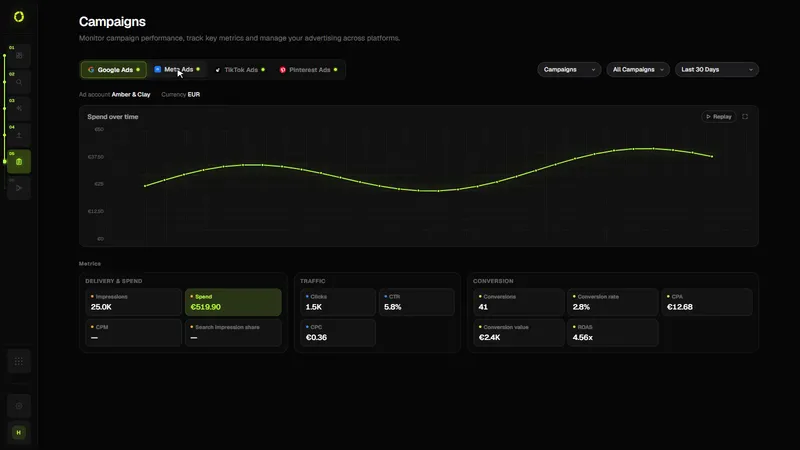
Testing needs a steady supply of meaningful variations. In Create, you can generate a campaign with several ads, each with its own copy and image or video, built from the same brief and brand context, so versions differ where you want them to. Campaigns shows results per platform and campaign, and Automations (from the Starter plan) can apply rules you set to your campaigns, such as pausing a campaign whose cost per acquisition (CPA) goes above your limit. If you want ideas for angles to test, see how to research competitor ads.
Sources
Official documentation this guide relies on, last checked . Platforms change their rules often; check the source before you rely on a number.