If you want more design control, look at a design platform such as Canva. If you want to avoid another subscription, use the generative features built into Meta Ads and Google Ads. If you mainly post organic social content, a social content tool fits better. If you need ads produced at volume in many sizes, consider a production-focused tool. And if you want the ads launched as campaigns too, not just exported as files, consider an all-in-one platform such as OrivenAI.
AdCreative.ai is known for generating ad creatives (images, banners and ad text in many sizes) from your brand assets, and it promotes features for scoring creatives and looking at competitors’ ads. It’s a reasonable choice for many advertisers. People look for alternatives for different reasons, though: they want more control over the design, they don’t want another tool next to Ads Manager, or they need help with what happens after the creative is made. The right alternative depends on which of those applies to you.
A note on fairness: we make OrivenAI, which is one of the options below. Tools in this space change their features and plans often, so we describe each by its main purpose and don’t quote prices. Check each vendor’s site for current details.
What to compare before switching
- Output: static images only, or also video, copy and carousels?
- Brand fit: does it use your logo, colors, fonts and tone, or produce generic templates?
- Control: can you edit the result precisely, or only regenerate it?
- What happens next: does it only export files, or also set up and publish campaigns?
- Platforms: which ad networks and formats it supports.
1. Canva: when you want full design control
Canva is a general design platform with AI features and a large library of ad templates for social, display and video formats. It suits teams that want to adjust every element by hand and keep everything in one design tool.
Consider it if design control matters more than speed. Keep in mind that it’s a design tool, not an ad manager: campaigns are still set up and launched in each platform.
2. Meta’s and Google’s built-in generative features: when you don’t want another tool
Meta Ads Manager offers generative features for Facebook and Instagram ads, such as text variations and image adjustments, and Google Ads can help write headlines and descriptions and generate image assets, for example in Performance Max campaigns.
Consider them if you advertise on one platform and want to stay inside it. Keep in mind that each works only for its own platform and only knows what you enter there.
3. Predis.ai: when organic social media is the main job
Predis.ai positions itself around generating social media content (posts, carousels and short videos) from a short description, with publishing and scheduling for social channels, and it also produces ad creatives.
Consider it if most of your work is organic posting and ads are secondary. Keep in mind that organic posts and paid campaigns have different requirements; check how it handles ad formats and campaign setup for the networks you use.
4. Creatopy: when you need volume in many sizes
Creatopy focuses on producing and adapting ad designs at scale, such as display and social ads in many sizes for teams that manage many campaigns or clients.
Consider it if you produce large sets of banners and resizes. Keep in mind that it’s aimed at production workflows; a small business with a few campaigns may not need that depth.
5. General AI assistants and image generators: when you want flexibility
Some advertisers use a general AI assistant for copy and a separate image generator for visuals. It’s flexible and often inexpensive.
Consider it if you’re comfortable writing prompts and assembling ads yourself. Keep in mind that you supply the brand rules every time, resize everything manually and do all campaign setup by hand.
6. OrivenAI: when you want the campaign, not just the creative
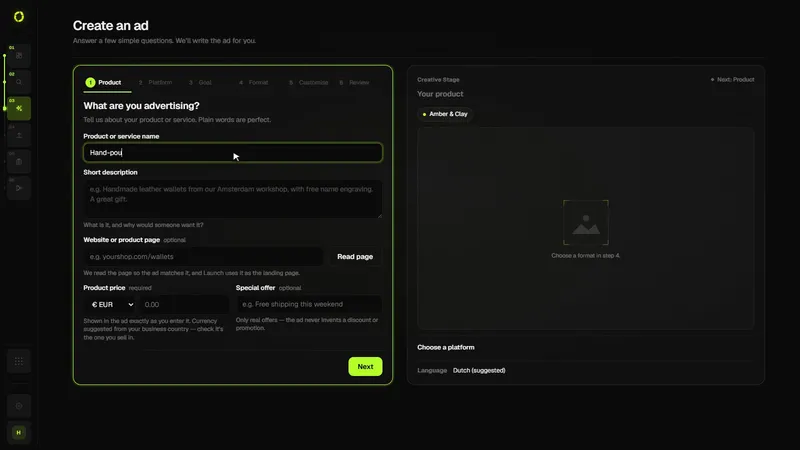
OrivenAI is an AI advertising platform rather than a creative generator. In Create, a short brief becomes a complete campaign in the chosen platform’s structure: ad copy, targeting, and image or video creative built from the business and brand context in your Control Center. Launch then checks the draft and publishes it to your own ad account on Google Ads, Meta Ads, TikTok Ads or Pinterest Ads through each platform’s official API, and Campaigns follows the results.
Consider it if the time you lose is in turning creatives into live campaigns across several platforms. Keep in mind that it offers less hands-on design editing than a dedicated design tool, and it isn’t built for producing hundreds of banner sizes.
Side-by-side
| Option | Main purpose | Launches campaigns? | Best fit |
|---|---|---|---|
| AdCreative.ai | AI-generated ad creatives in many sizes | Check vendor | Advertisers who want creatives fast |
| Canva | Design platform with AI features and ad templates | No, designs only | Teams that want full design control |
| Meta / Google built-in AI | Generative help inside each ad platform | Yes, within that platform | Single-platform advertisers |
| Predis.ai | Social content and ad creatives with scheduling | Check vendor | Organic-first social teams |
| Creatopy | Ad design production at scale | Check vendor | High-volume, multi-size production |
| AI assistant + image generator | Flexible copy and images | No | Hands-on, prompt-savvy marketers |
| OrivenAI | Research, create, launch and automate campaigns | Yes: Google, Meta, TikTok, Pinterest | Small teams running ads on several platforms |
How to decide in an afternoon
- Write down the step that takes you longest today: designing, resizing, writing, setting up or launching.
- Shortlist two tools whose main purpose is that step.
- Run the same brief through both, and turn the result into one real campaign.
- Compare total time from brief to live campaign, and how much editing each needed.
Still deciding which kind of tool you need at all? Our overview of AI advertising tools for small businesses covers the wider landscape.